Ever download five productivity apps and end up less organized than before? You’re not alone, the sheer number of options makes choosing genuinely confusing. Here’s a clear breakdown of the top picks in 2026, organized by what you actually need.
Best Apps for Task Management
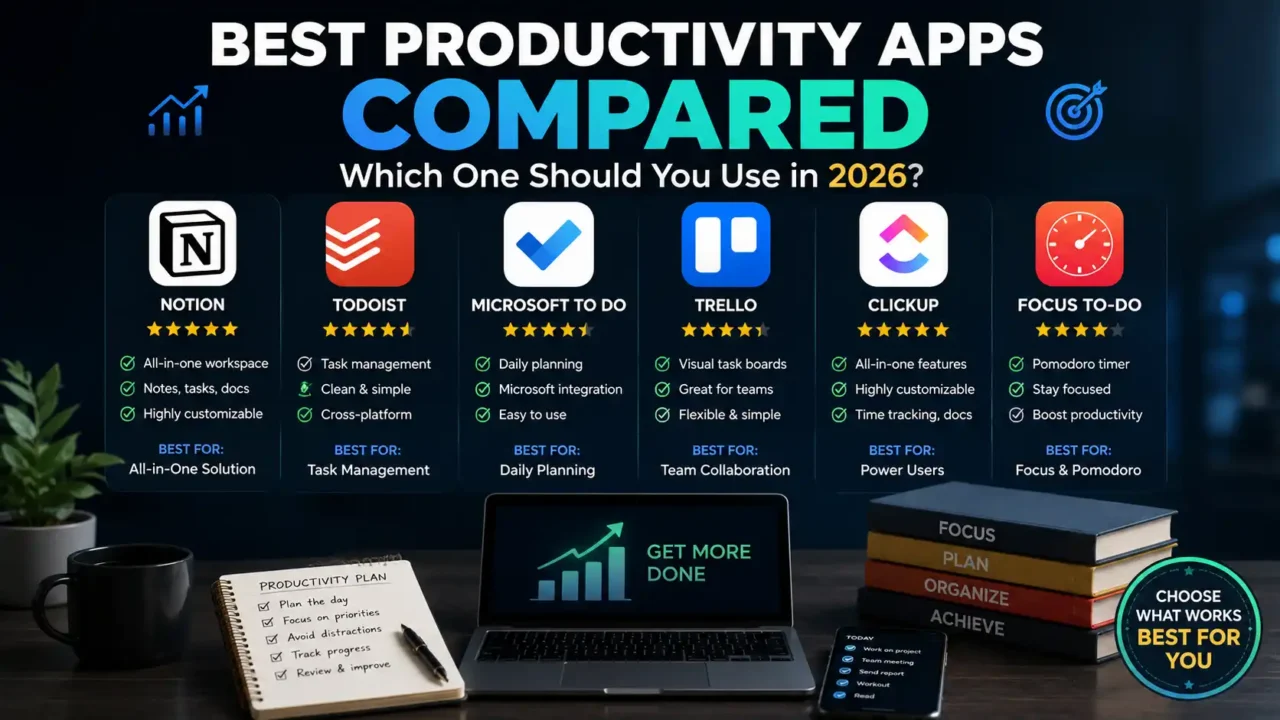
Todoist remains a top pick for personal task management thanks to its simple, fast task capture and natural-language due dates. For teams needing more structure, Asana and Trello offer visual boards and advanced project tracking features. Choosing between them usually comes down to whether you need personal simplicity or team-wide project oversight.
Best Apps for Note-Taking and Knowledge Management
Notion continues to lead as an all-in-one workspace, combining notes, databases, and templates in a flexible system. Obsidian appeals to users who prefer private, locally stored notes with powerful linking between ideas. The right choice depends on whether you value cloud collaboration or full control over your personal knowledge base.
How to Remember More of What You Read: 7 Science-Backed Strategies
Best Apps for Time Tracking and Focus
RescueTime automatically tracks how you spend time across apps and websites, offering useful awareness without manual logging. Toggl Track is better suited for those who want detailed, hands-on time tracking for specific projects. For pure focus, apps like Forest and Freedom help block distractions during dedicated work sessions.
Best Apps for Calendar and Scheduling
Google Calendar remains the reliable standard for straightforward scheduling and cross-platform syncing. Reclaim.ai adds a smarter layer by automatically finding and protecting time for focused work around existing meetings. Together, these tools help balance structured scheduling with flexible, protected deep work time.
Best AI-Powered Productivity Tools
AI assistants like Claude and ChatGPT are increasingly used for drafting, research, and complex problem-solving support. These tools work best when paired with your existing workflow, rather than replacing task managers or calendars entirely. Adding one AI assistant into your routine often delivers noticeable time savings with minimal setup.
AI Productivity Systems Anyone Can Build: Work Smarter With Artificial Intelligence
Best Apps for Team Communication and Collaboration
Slack remains the standard for team messaging, offering integrations that connect nearly every other productivity tool. For simpler needs, Google Chat provides a lightweight alternative for straightforward team messaging. The right pick often depends on how deeply integrated your team’s existing tools already are.
Free vs Paid: What’s Actually Worth Paying For
Many productivity apps offer solid free tiers, especially Google Calendar, Apple Notes, and basic versions of Todoist. Paid upgrades typically unlock advanced features like automation, unlimited projects, or deeper integrations. It’s usually worth starting free and upgrading only once you hit a genuine limitation in daily use.
Building the Right Productivity Stack for You
Rather than chasing every trending app, most people benefit from a simple, focused stack of just three or four tools. A solid starting combination often includes one task manager, one note-taking app, one calendar tool, and one AI assistant. Keeping the system simple makes it far more likely you’ll actually stick with it long term.
Final Thoughts
The best productivity app isn’t necessarily the most popular one, it’s the one that fits how you actually work. Whether you prioritize simplicity, deep customization, or AI assistance, 2026’s top tools offer something for nearly every workflow. Building a small, intentional stack often beats collecting apps you’ll rarely open.
Call to Action
Which productivity app do you currently rely on most? Share this article with someone building their own productivity system, and drop your thoughts in the comments below. Explore more evidence-based articles in the Aziz Publishing Knowledge Library to learn how psychology, habits, mindset, and decision-making shape the way we work, learn, and live.