Science & Technology

How Encryption Works: Explained With Everyday Examples

Curious how encryption actually protects your data? This beginner’s guide breaks it down with simple, everyday examples, no jargon.

How Encryption Works: Explained With Everyday Examples

That little padlock icon next to your browser’s address bar is doing something pretty remarkable, scrambling your data so thoroughly that even powerful computers can’t crack it without the right key. Here’s how encryption actually works, explained without the intimidating math.


What Encryption Actually Is, in Plain English

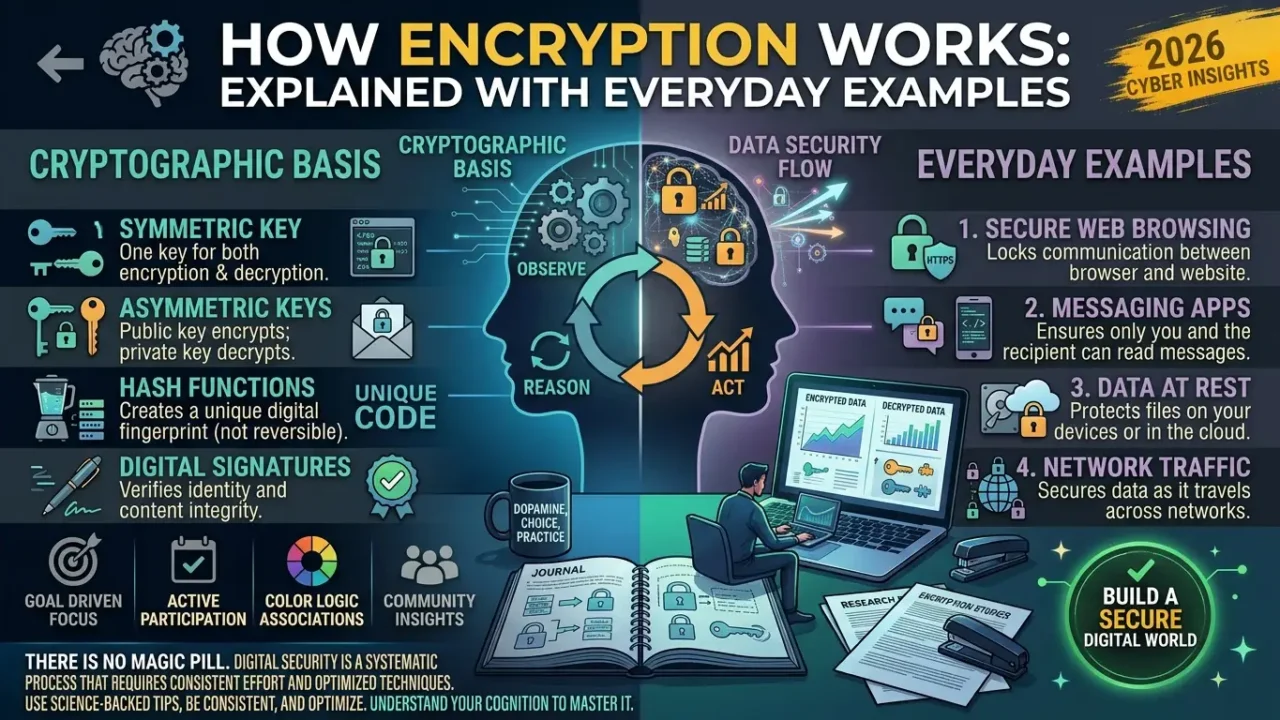
Encryption is the process of scrambling readable information into an unreadable format, so that only someone with the correct key can turn it back into something meaningful. Think of it like writing a note in a language only you and your friend understand, anyone else who intercepts it just sees gibberish. The original readable information is called “plaintext,” and the scrambled, unreadable version is called “ciphertext.” Encryption doesn’t stop someone from seeing your data, it just makes sure that what they see is useless without the key to unlock it.


The Lockbox Analogy That Makes This Click

Imagine you want to send a valuable item to a friend through the mail, but you don’t trust the delivery service not to peek inside. You could put the item in a lockbox and mail it, but if you also mail the key in a separate envelope, anyone who intercepts both packages can just open the box anyway. Encryption solves this exact problem, it’s a system for locking information in a way that only the intended recipient can unlock, even if the “delivery service,” meaning the internet, isn’t fully trustworthy. This lockbox analogy captures the core goal of encryption, protecting information in transit even when you can’t fully control who might intercept it along the way.

How to Spot a Deepfake in 2026: Real Tips That Work


Symmetric Encryption: One Key for Everything

Symmetric encryption uses a single key to both scramble and unscramble the information, similar to a physical lock and key where the same key opens and closes the lock. If you and a friend both have a copy of that same key, either of you can lock or unlock messages between you using it. This approach is fast and efficient, which is why it’s commonly used for encrypting large amounts of data, like an entire hard drive or a big file. The catch is that both parties need the same key beforehand, which creates a real challenge, how do you safely share that key in the first place without someone intercepting it along the way?


Asymmetric Encryption: Two Keys Solve the Sharing Problem

Asymmetric encryption solves the key-sharing problem by using two mathematically related keys instead of one, a public key and a private key. The public key can be shared with literally anyone, even posted publicly, and it’s used to lock, or encrypt, a message. The private key, kept completely secret by its owner, is the only thing that can unlock, or decrypt, a message that was locked with its matching public key. This is like a mailbox with a slot anyone can drop mail into, that’s the public key, but only the owner has the actual key to open the mailbox and read what’s inside, that’s the private key.


How This Actually Protects You Online

When you visit a website with “https” in the address bar, that “s” stands for secure, and it means your connection to that site is encrypted using a combination of these techniques. Your browser and the website use asymmetric encryption briefly to safely agree on a shared secret, then switch to faster symmetric encryption for the actual data exchange during your session. This combination gives you both the security of asymmetric encryption’s safe key exchange and the speed of symmetric encryption for handling large amounts of data, like video streaming or file downloads. This is why online banking, shopping, and even casual browsing on public WiFi remain reasonably safe from anyone else on that same network trying to snoop on your traffic.


Why Your Passwords Aren’t Actually Stored As-Is

When you create an account somewhere, that service typically doesn’t store your actual password, instead it stores something called a “hash,” a scrambled, one-way transformation of your password that can’t be reversed back into the original text. When you log in later, the system hashes what you typed and compares it to the stored hash, rather than comparing your typed password directly to a stored copy. This matters enormously for security, because if a company’s database gets breached, hackers typically get a pile of scrambled hashes rather than your actual usable password. This is also exactly why reusing passwords across multiple sites is risky, a breach on one weakly-secured site can expose patterns that make your other accounts easier to guess.

The Basics of Blockchain — Beyond Cryptocurrency


Real-World Places You Encounter Encryption Daily

Messaging apps like Signal and WhatsApp use what’s called end-to-end encryption, meaning messages are scrambled on your device and only unscrambled on the recipient’s device, so not even the app’s own servers can read the actual content in between. Your phone’s lock screen encryption protects the data stored on the device itself, which is why losing a phone is far less catastrophic than it would be without this protection built in. Even things like Wi-Fi networks use encryption protocols to prevent someone nearby from easily intercepting the data flowing between your device and your router. Encryption has quietly become the invisible infrastructure underneath nearly every digital interaction you have throughout an average day.


What Encryption Can and Can’t Protect You From

Encryption is genuinely powerful, but it’s not a magic shield against every kind of digital risk, and understanding its limits matters just as much as understanding its strengths. It protects data in transit and storage from being read by unauthorized parties, but it can’t protect you if you’re tricked into willingly handing over your password through a phishing scam. It also can’t help if malware is already running on your device, capturing what you type before encryption ever gets a chance to kick in. Encryption is one genuinely essential layer of digital security, but it works best alongside good habits like unique passwords, two-factor authentication, and healthy skepticism toward suspicious links.


Final Thoughts

Encryption ultimately comes down to a simple idea, scrambling information so only the right key can unscramble it, whether that’s through a shared secret key or a clever public-private key pair. From the padlock icon in your browser to the messages on your phone, this invisible process is working constantly in the background to keep your digital life reasonably private.

Next time you see that little padlock icon, you’ll actually know what’s happening behind it instead of just trusting it blindly. If this explanation made encryption finally click for you, share it with someone who’s always wondered what “https” actually means.


Call to Action

Next time you see that little padlock icon, you’ll actually know what’s happening behind it instead of just trusting it blindly. If this explanation helped, share it with someone who’s always wondered what “https” really means. Explore more articles in the Aziz Publishing Knowledge Library to discover evidence-based insights on productivity, psychology, habits, mindset, writing, and the technologies shaping the future of work.

Stop Letting Your Mind Sabotage You

Continue with the Book

Stop Letting Your Mind Sabotage You

Explore the deeper framework for understanding self-sabotage, rebuilding self-trust, and creating meaningful personal change.